 |
LTTng control library C API
|
|
LTTng control library C API
|

The documentation of the recording session snapshot API is incomplete.
The text below shows the typical usage of this API, but the types, enumerators, and functions of lttng/snapshot.h aren't documented individually.
A recording session snapshot is a dump, local or remote, of the current ring buffers of all the event record channels of a recording session, without clearing them.
Unlike recording session rotations, snapshots may overlap: successive snapshots may contain the same event records.
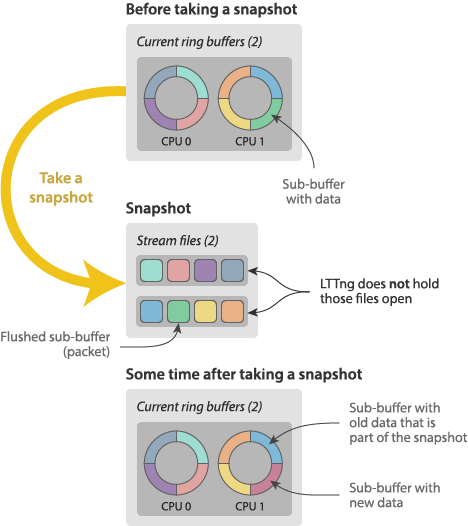
See Recording session descriptor API, lttng_session_descriptor_snapshot_create(), lttng_session_descriptor_snapshot_local_create(), and lttng_session_descriptor_snapshot_network_create() to learn how to create a recording session in snapshot mode.
When you create a recording session descriptor with lttng_session_descriptor_snapshot_create(), the recording session which lttng_create_session_ext() creates from it has no default snapshot output: you need to either set one with lttng_snapshot_add_output() or provide one when you take a snapshot with lttng_snapshot_record().
A recording session may have zero or one default snapshot output.
To set the default snapshot output of a recording session:
Specify the output destination with one of:
lttng_snapshot_output_set_local_path()
lttng-relayd(8)) lttng_snapshot_output_set_network_url()
lttng_snapshot_output_set_network_urls()
See Output URL format to learn more about output URLs.
When you're done with the descriptor, destroy it with lttng_snapshot_output_destroy().
This only destroys the descriptor; it doesn't remove the default snapshot output of the targeted recording session (use lttng_snapshot_del_output() for this).
To inspect the existing snapshot outputs of a given recording session:
Iterate the list of step 1 with lttng_snapshot_output_list_get_next() until it returns NULL.
With a (borrowed) snapshot output descriptor, you may get:
To take a snapshot of a recording session:
Call lttng_snapshot_record().
Passing NULL as the output uses the default snapshot output of the targeted recording session.
The wait parameter is currently ignored: the call always blocks until the snapshot operation completes.
The function returns 0 on success, or a negative lttng_error_code enumerator on error.
 1.9.8
1.9.8 