 |
LTTng control library C API
|
|
LTTng control library C API
|

Modules | |
| Trace chunk archive location API | |
The documentation of the recording session rotation API is incomplete.
The text below shows the typical usage of this API, but the types, enumerators, and functions of lttng/rotation.h aren't documented individually.
A recording session rotation is the action of archiving the current trace chunk of a recording session to the file system.
Once LTTng archives a trace chunk, it doesn't manage it anymore: you can read it, modify it, move it, or remove it.
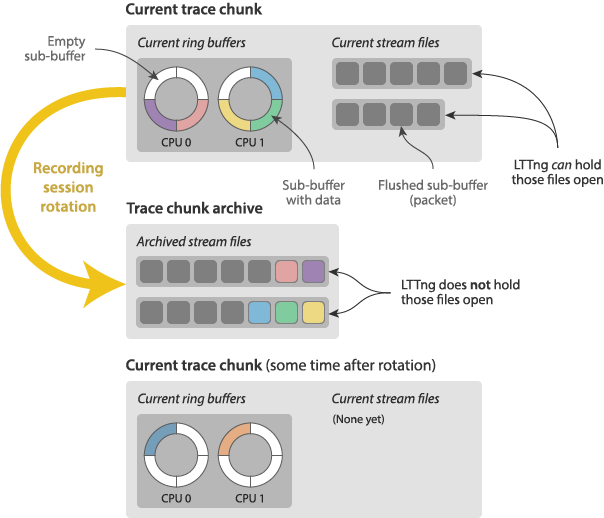
A trace chunk archive is a collection of metadata and data stream files which form a self-contained LTTng trace. See the “Trace chunk naming” section of lttng-concepts(7) to learn how LTTng names a trace chunk archive directory.
The current trace chunk of a given recording session includes:
The first time the recording session was started.
lttng_rotate_session().
lttng-rotate(1)A rotation schedule previously set with lttng_session_add_rotation_schedule().
lttng-enable-rotation(1)To perform an immediate recording session rotation:
NULL to use default options).lttng-rotate(1)A recording session rotation schedule allows automatic rotation based on a size or time threshold.
To add a rotation schedule to a given recording session:
Create and configure a rotation schedule descriptor with one of:
Create with lttng_rotation_schedule_size_threshold_create().
Then, set the size (bytes) threshold with lttng_rotation_schedule_size_threshold_set_threshold().
Create with lttng_rotation_schedule_periodic_create().
Then, set the period (µs) with lttng_rotation_schedule_periodic_set_period().
Add the rotation schedule to the targeted recording session using the descriptor of step 1 with lttng_session_add_rotation_schedule().
When you're done with the rotation schedule descriptor, destroy it with lttng_rotation_schedule_destroy().
This function doesn't cancel the rotation schedule: use lttng_session_remove_rotation_schedule() to remove a rotation schedule from a recording session.
To inspect the existing rotation schedules of a given recording session:
Borrow a rotation schedule from the list of step 1 with lttng_rotation_schedules_get_count() and lttng_rotation_schedules_get_at_index().
With a rotation schedule, you may get:
Depending on its type:
Its current trace chunk size (bytes) threshold with lttng_rotation_schedule_size_threshold_get_threshold().
 1.9.8
1.9.8 